
What Lies Beneath the MDA
Your navigator can give you a useful vertical path past the MDA to the runway, but that doesn’t mean the approach was designed for you to follow it all the way down.
Let’s say you’re inbound to Sidney Municipal (N23) on a scuddy IFR day in the Catskills. Winds are calm and your arrival direction favors Runway 25, so you load the RNAV (GPS) RWY 25, capture the advisory glidepath (+V), and ride it down until you break out with the runway in sight. Well, “in sight” is legal as you have somewhere just south of 3 statute miles visibility, but it sure is nice to have that glidepath to keep you stabilized and on target. You land, taxi in, and get on with your life.
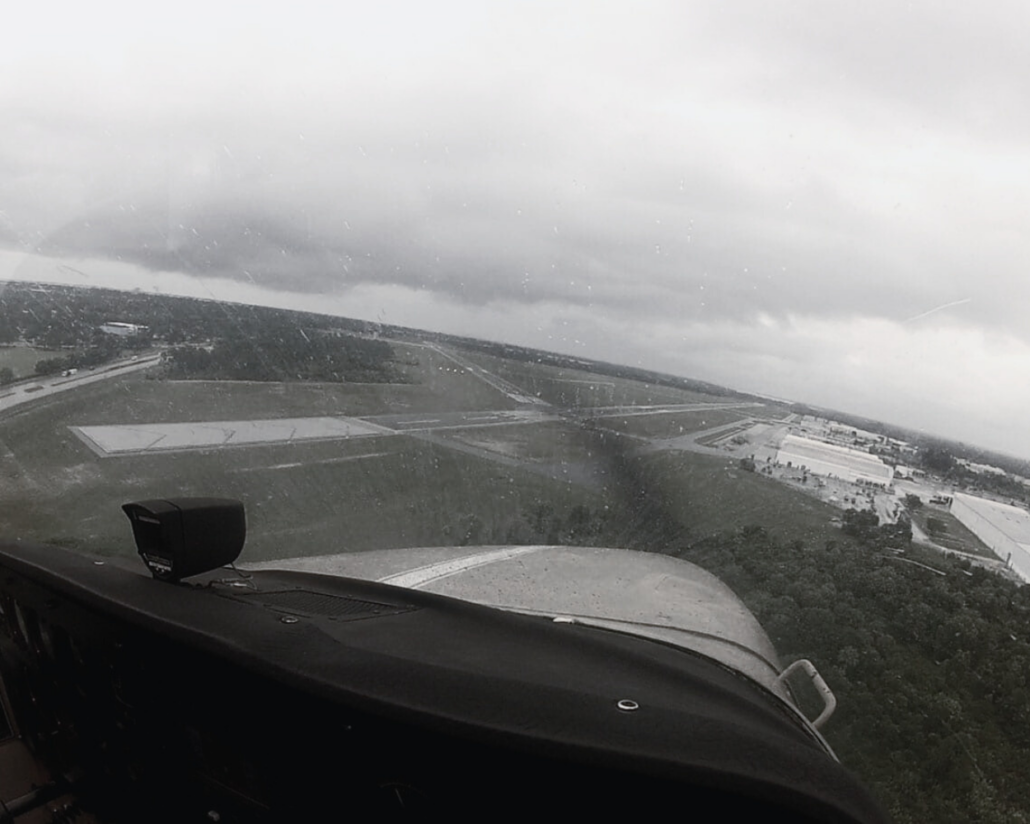
Now let’s do it again but with your arrival favoring Runway 7. Same airport, same weather, same avionics, and the same desire to use all the tools for a stable, on-target approach. You load the RNAV (GPS) RWY 7, capture the advisory glidepath, and head down. You emerge from the clouds to see, not a runway, but a hillside. You glance down to the glidepath and see you’re dead center—but look back up to realize you’re about to be dead center on that hill.
You pitch and power up hard and pass over the trees about 1.5 NM short of the runway, close enough to worry about leaves in the wheelpants. (Check out our companion Sim Challenge if you want to watch that happen in your home simulator.)
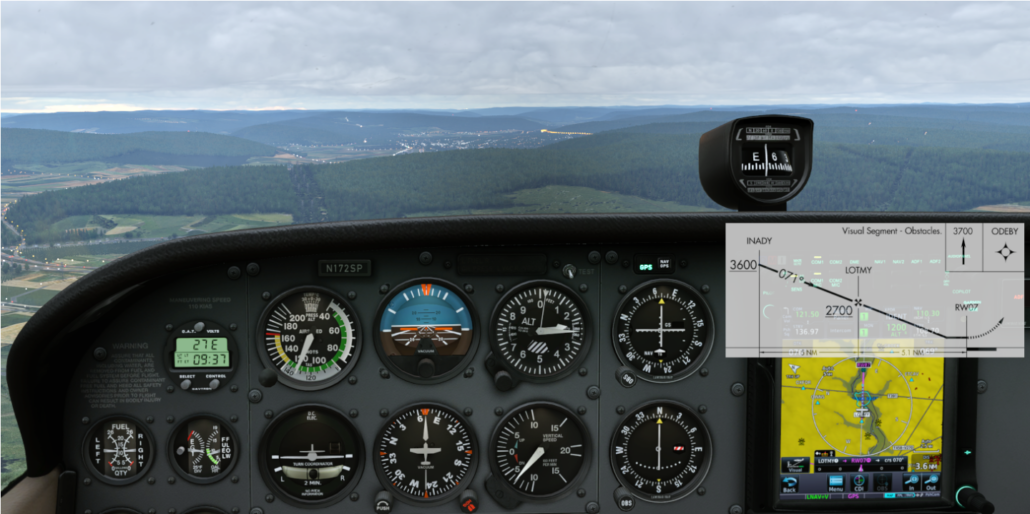
Check out our companion Sim Challenge if you want to watch that happen in your home simulator.
What’s the difference between these two approaches? Both are LNAV only. Both offer advisory glidepaths (a.k.a. “LP+V” or “LNAV+V,” respectively). Your avionics displays the same glidepath cues you get for the LPV at your home airport. Yet one runway lets you get away with treating that cue like the real thing, and the other… doesn’t.
The problem is that a reasonable procedure, a helpful box, and a pilot trained to fly a stabilized approach can still combine to make the wrong move seem right. The essential detail is that neither of these two approaches at Sidney give you protected vertical guidance below the MDA.
Reading Between the Lines
There are clues on the charts. (And, no, it’s not that Runway 25 offers LP minimums. This has nothing to do with minimums.)
Neither procedure guarantees obstacle clearance along the path to the runway once you’re below the MDA. The expectation is that before leaving the MDA, you have the visibility, visual references on the airport, and are in a position from which a normal descent can be made using normal maneuvers required by 14 CFR 91.175 (c). It follows that you can then visually avoid anything poking up between you and the runway.
Runway 25 gives you the usual cues for making that judgment: a published Visual Descent Angle (VDA) of 3.66°, a Visual Descent Point (VDP) 2.6 NM from the threshold, and a PAPI waiting for you to go visual. While that doesn’t turn the LNAV into protected vertical guidance, it does give you references for deciding whether the descent in front of you is “normal.” And that VDA is probably the +V angle used by your GPS navigator. It’s the angle from the FAF at SIBJI to the touchdown zone.
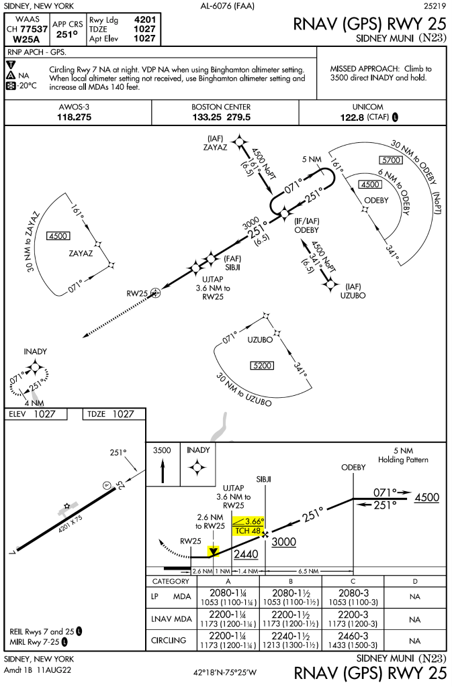
The profile view on the N23 RNAV (GPS) RWY 25 approach plate includes a VDP, VDA/TCH, a published Visual Descent Angle (VDA) of 3.66°, Visual Descent Point (VDP), and a Threshold Crossing Height (TCH). This means the 3° slope must be clear of obstacles.
This is where Sidney’s approaches to Runways 25 and 7 part company. The Runway 7 chart has no such angle, even though the GPS navigator will still offer +V. There’s no VDP or PAPI, either. The chart has not forgotten to give you the normal descent assistance. It is declining to bless any.
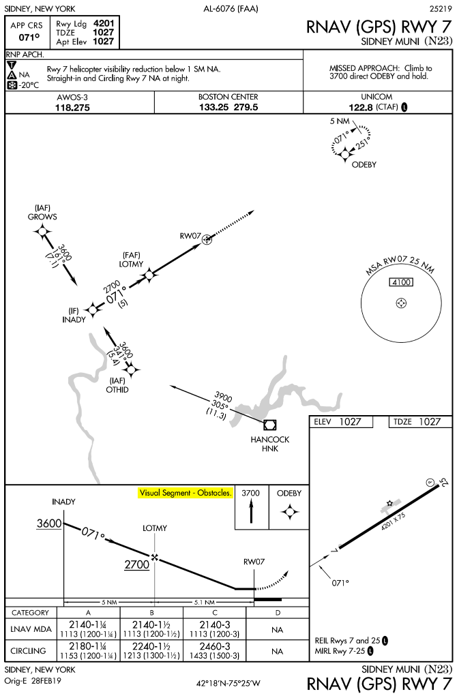
The profile view’s lack of a published descent angle and visual descent point, plus the “Visual Segment – Obstacles” note, means not all is as it seems on this approach.
AIM 5-4-5(k)
Obstacles may penetrate the obstacle identification surface below the MDA in the visual segment of an IAP that has a published VDA/TCH. When the VDA/TCH is not authorized due to an obstacle penetration that would require a pilot to deviate from the VDA between MDA and touchdown, the VDA/TCH will be replaced with the note “Visual Segment–Obstacles” in the profile view of the IAP.
AIM 5-4-5 (k) is surprisingly clear on this topic. Even though a VDA might appear on the chart, it doesn’t guarantee obstacle protection below the MDA. That section below the MDA as you descend to the runway is the “visual segment.” The AIM also notes that the presence of a VDA doesn’t change non-precision approach requirements. Put more plainly, an LNAV approach with a glidepath-looking thing displayed on your avionics is still just an LNAV approach. The MDA does not turn into a DA just because the box offers you a vertical path.
The AIM is equally clear that if obstacles in the visual segment would require a pilot to deviate from the vertical path between the MDA and touchdown, the VDA/Threshold Crossing Height (TCH) is not authorized and is replaced with the note “Visual Segment – Obstacles.”
That note is the FAA’s way of suggesting that you probably shouldn’t follow the vertical path below the MDA on that procedure no matter how good the visibility—or at least follow it with extreme suspicion.
The Role of Advisory VNAV
Continuous descent final approaches have been a staple in professional flying for a long time. They have proven safer and easier to manage than the old-fashioned, dive-and-drive method of flying a non-precision approach. This technique manifests in general aviation avionics as the +V advisory glidepaths for non-precision approaches.
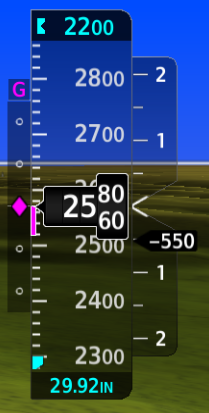
On the Garmin G1000 NXi, the Glidepath Indicator is the same magenta diamond symbol for both official vertical guidance and advisory vertical guidance.
Since advisory vertical navigation encourages stabilized approaches to the MDA, AIM 5-4-5(k)(1)(b) notes that navigation data providers are allowed to calculate and provide vertical angles to pilots—even where the FAA does not provide one. However, it reiterates: “Pilots are cautioned that they are responsible for obstacle avoidance in the visual segment regardless of the presence or absence of a VDA/TCH and associated navigation system advisory vertical guidance.”
Unpacking this, what you should take away is that following advisory vertical guidance is optional, but an excellent choice, down to the MDA. There should be no obstacle issues (assuming you cross above any stepdown altitudes on the way down). It’s just below the MDA where trouble may lurk.
Not all visual segment penetrations are equal. Offending obstacles are quite common. The penalty is often just increased visibility requirements, no VDP, or a restriction on using the approach at night. These are the FAA’s way of ensuring you have sufficient opportunity to see the obstacles below the MDA before you hit them. The Runway 25 Approach has some visual penetrations to the 34:1 slope that’s evaluated up from the runway (a 3° glidepath is a 20:1 slope, so the 34:1 is a shallower area beneath it). How can you tell? The Runway 25 Approach has a VDP, which requires a clear 20:1 slope. But it doesn’t have the light grey line (known as the stipple line) connecting the VDP to the runway. That requires a clear 34:1 slope. So the 34:1 slope must have penetrations.
“Visual Segment – Obstacles“ is more serious. AIM 5-4-5 says the note appears when an obstacle penetration would require a pilot to deviate from the VDA between the MDA and touchdown. Something along the centerline pokes into the vertical path that you would follow.
For Runway 7, that’s an entire hillside. So “Visual Segment – Obstacles” says more than the visual segment isn’t entirely clear. It’s closer to: “That normal-looking path you want to fly down to the runway isn’t going to work.” But unless you know the nuances of the visual segment, that note may seem to undersell its importance.
The Last Mile
Garmin Service Alert
Advisory vertical guidance provides vertical path information only and does not provide obstacle or terrain clearance assurance in the visual segment of an approach. Although advisory vertical guidance can assist with maintaining a glidepath angle that complies with altitude restrictions, it remains the pilot’s responsibility to fly in strict compliance with the published approach procedure.
This is fundamentally a human-factors problem. The GPS annunciation may say LP+V instead of LPV, and the minima line may say MDA, but when the workload is high … you see how this could go poorly. It’s a textbook setup for a negative learning transfer—in this case, following an LP+V glidepath the same way you would for an LPV approach … right past the MDA. (It’s worth noting that Garmin issued Service Alert 26027 on March 12, 2026 addressing this very issue.)
The practical defense is understanding that the approach provides obstacle protection above MDA. The advisory glidepath helps you fly a stabilized approach to the MDA. From there, you must have the required visual references to continue. The GPS navigator will continue depicting a straight path to the runway, but it’s on you to ensure that path is clear.
The cues you’re looking for are: +V on the navigator (which will always be to an MDA, not DA), no VDA, no VDP, no VGSI, no TCH, and especially, “Visual Segment – Obstacles,” indicating that the visual descent from MDA to the runway may not be straightforward. This may require some adjustments that strain the definition of normal maneuvers.
In those cases, the honest answer at the MDA may be that you just can’t get there from here.
Continue Reading
For a deeper dive into the complexities surrounding advisory vertical guidance, read The Advisory Vertical Guidance Catch-22.

- What Lies Beneath the MDA - June 25, 2026
- Sim Challenge: Trusting the Wrong Glidepath - June 23, 2026
- Sim Challenge: The Lowdown (IFR) - February 3, 2026

Lee-
When I did the RNAV 7 to RWY 7 in my ELITE simulator, which had a recent Jepp database (a few months old) for the 430W (which is modeled using Garmin’s 430W software), I did not get a +V. I did get +V for the RWY 25 approach.
I don’t think that’s a bad thing…I personally don’t think a +V glideslope should be shown if following it below MDA could cause one to run into terrain or an obstacle. Someone will eventually do it!
Here’s what I got when I asked Google about it: “No, when flying the RNAV (GPS) RWY 7 approach into Sidney Municipal Airport (N23), your Garmin GNS 430W will not present an advisory glideslope (+V).Why the GNS 430W Won’t Provide a Glidepath (+V): While the Jeppesen and Garmin databases store a Vertical Descent Angle (VDA) of 3.00° for this approach, the FAA has specifically flagged the visual segment of this runway.The Constraint: The FAA approach chart for N23 RNAV Rwy 7 displays a prominent warning in the profile view: “Visual Segment – Obstacles”.Garmin’s Rule: Garmin intentionally codes its database to suppress the advisory vertical glidepath (LNAV+V annunciation) on any approach where the FAA notes penetrating obstacles in the visual segment between the MDA and the runway.”
Hi Justin,
Thanks for the comment. I don’t have an ELITE simulator to test with, so I can’t speak to how it handles it. I typically develop the scenarios using current data in X-Plane 12 and also test in FS2024. However since this topic depends on nuanced GPS behavior, I also tested it using a GTN 650 through the Garmin Trainer application with current data and did get the +V indication for the RNAV (GPS) RWY 7, so I’m fairly confident that it would appear in a real airplane. I didn’t test with the 430W simulator though.
I can’t speak to any specific limitations on the 430W, but I wouldn’t put much confidence behind the answer that you got from Google. As far as I can tell, I believe the statement that Garmin suppresses the advisory vertical glidepath when there is a “Visual Segment – Obstacles” note is incorrect, or at least is not current. I think that was the case many years ago, but the Garmin Service Alert mentioned in this article would imply that they currently do provide advisory guidance on such procedures, otherwise there wouldn’t be a need to remind operators about appropriate use by issuing the alert. Take a look at the “Catch 22” article linked above for more of the backstory.
Best,
Lee
Thanks for the reply Lee. Thanks for the SIM challenge and for the article. Please keep them coming! I think the SIM challenge is one of the best ways for experienced/long standing IFR pilots to learn about unusual situations and do things they don’t usually do. For me, it’s been flying the sim where SIDS and STARS are required, circling, etc.
I’ll be on the lookout for approaches with the comment “Visual Segment – Obstacles”. This seems like a situation where inevitably someone is going to be following the +V with their autopilot, will blow through the MDA accidentally in IMC, and run into terrain or an obstacle, and should be rectified with removal of the +V. I was hoping that my experience with the 430W simulator and a database from April meant something had been done about it.
As you may know, Bruce Williams just published an article about the same issue for the August AOPA Pilot that I just received. He mentioned that a rep from NBAA reviewed this issue at the April, 2026 FAA-industry Instrument Procedures Group, and recommended changing the not to “Use of VNAV below MDA NA”. The rep also recommended to remove VDAs from databases when obstacles intrude below the MDA.
Lee-
My issue with not getting +V at N23 with the 430W is not just due to the visual segment having obstacles. I just tried the approach used as an example in Bruce’s article (4A6 RNAV 4) has obstacles in the visual segment and I get a +V there. Went back this AM and tried the RNAV 7 at N23 and still did not get the +V. Just wanted to report it here in case others experience the same issue.