
|
Getting your Trinity Audio player ready...
|
Sim Challenge: There and Back Again
Editor’s Note: Introducing the Sim Challenge
Flying IFR is about more than procedures and button-pushing—it’s about judgment, timing, and managing workload when the pressure is on. The simulator is the perfect place to practice those skills, but it helps to have a scenario that makes you think like a pilot.
That’s where our new Sim Challenge comes in from Lee Smith and Jeff Van West. Each installment presents a realistic scenario—complete with weather, NOTAMs, and ATC clearances—that you can load into your home simulator. We’ll guide you through the setup, brief the flight, and then walk through the scenario step-by-step, asking questions along the way.
Click on any question to reveal the expert explanation—why a particular choice is correct, what details are relevant, and how the decision affects the rest of the flight. This interactive approach lets you test your judgment first, then learn from real-world insights.
The goal isn’t to stump you—it’s to get you thinking critically about your decisions and procedures in a safe, repeatable environment and give you an opportunity to test your skills and judgment under realistic IFR conditions.
We’ll kick off the series with a short but demanding hop from White Plains (KHPN) to Danbury (KDXR)—a 21-mile sprint that proves even the simplest flights can turn into real workload management tests.
Even the shortest flights can leave you wanting “a very long holiday.”
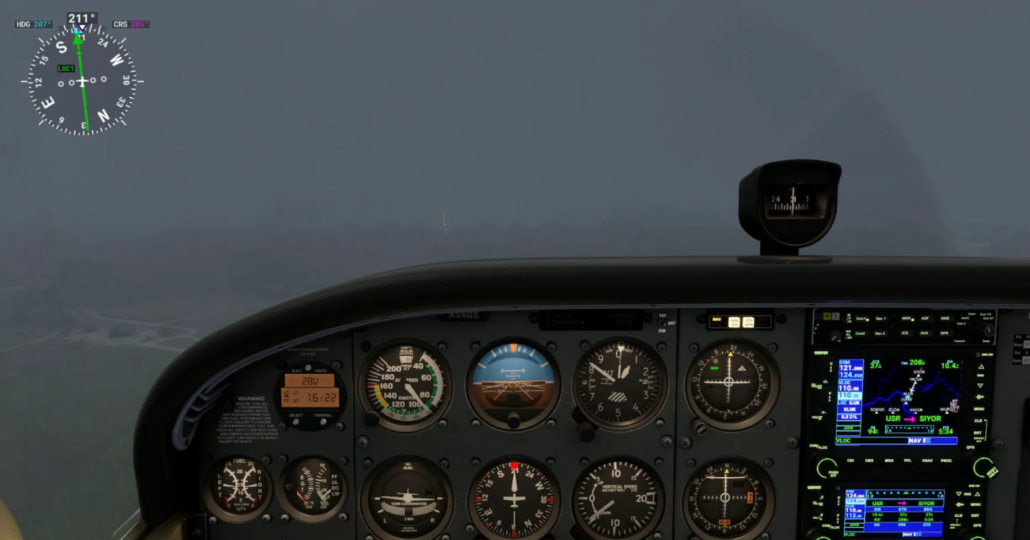
The cognitive effects of time compression and task saturation make these short flights some of the most demanding you’ll encounter.
For this inaugural Sim Challenge let’s just make it a nice short flight from White Plains, New York (KHPN) to Danbury, Connecticut (KDXR). At 21nm from start to finish, there isn’t much time for things to go wrong, or much time at all, really. And therein lies the rub. We typically estimate the subjective challenge of a flight to be proportional with the length of the flight. When it comes to weather flying, performance considerations, and fatigue management, there’s certainly something to be said for that.
However, short IFR flights can be quite “wide,” meaning there’s no downtime once you start moving. The cognitive effects of time compression and task saturation make these some of the most demanding flights that you’ll encounter. To succeed, you’ll need to start your arrival planning before you even leave the ground.
Setup & Planning:
- Aircraft:
- Any IFR-certified, WAAS-equipped aircraft (Cessna 172, Cirrus SR22, Beech Baron, etc.). This challenge scales with speed.
- Location:
- Positioned on Runway 11 at KHPN
- HPN ATIS (Manually set these conditions for your simulator):
- “HPN ATIS INFO V 1856Z. 10010 1 3/4SM OVC005 15/13 A2992. ILS RWY 16 IN USE. LANDING 16. DEPARTING 11, 16. NOTAMS. ILS RWY 34 OTS, ILS RWY 16/34 UNMONITORED. CAT 2 NA. CAUTION, BIRDS NEAR AIRPORT. READBACK ALL RWY HOLD SHORT INSTRUCTIONS. …ADVS YOU HAVE INFO V.”
- NOTAMS:
- !DXR 10/001 DXR OBST TOWER 401 (ASN 2018-ASO-1533-OE) 412515.20N/0732840.10W (1.3NM E DXR) 1059FT (459FT AGL) LGTD
- !DXR 08/025 DXR TWY C CLSD BTN TWY B AND RWY 26
- !DXR 08/024 DXR AD AP GRASS CUTTING IN PROGRESS VICINITY ALL RWYS
- !DXR 08/023 DXR AD AP ASOS OUT OF SERVICE
- !FDC 5/1234 DXR IAP DANBURY MUNI, DANBURY, CT. RNAV (GPS) RWY 26, ORIG… PROCEDURE NA
- !HPN 08/083 NAV ILS RWY 16 SPECIAL AUTH CAT II NA.
- !HPN 08/082 NAV ILS RWY 16 GP NOT MNT.
- !HPN 03/036 NAV ILS RWY 34 NOT MNT DLY 0300-1000.
Departing HPN
Assume you call for your clearance to Danbury and get:
“Cleared to the Danbury airport, Westchester Eight departure, then direct. Climb via SID, expect four thousand ten minutes after departure. Departure frequency one two six point four, squawk four five two one.”
Take your time and get prepared for the whole flight—it’ll come at you fast. Make a plan for getting into Danbury. Then complete both your departure and approach briefings before pushing the throttle forward. Once you’re ready, consider yourself released for departure and cleared for takeoff.
As you check in on the Westchester Eight with New York Departure, they tell you:
“Radar contact, expect the RNAV (GPS) Z RWY 8 approach at Danbury, proceed direct EZHED.”
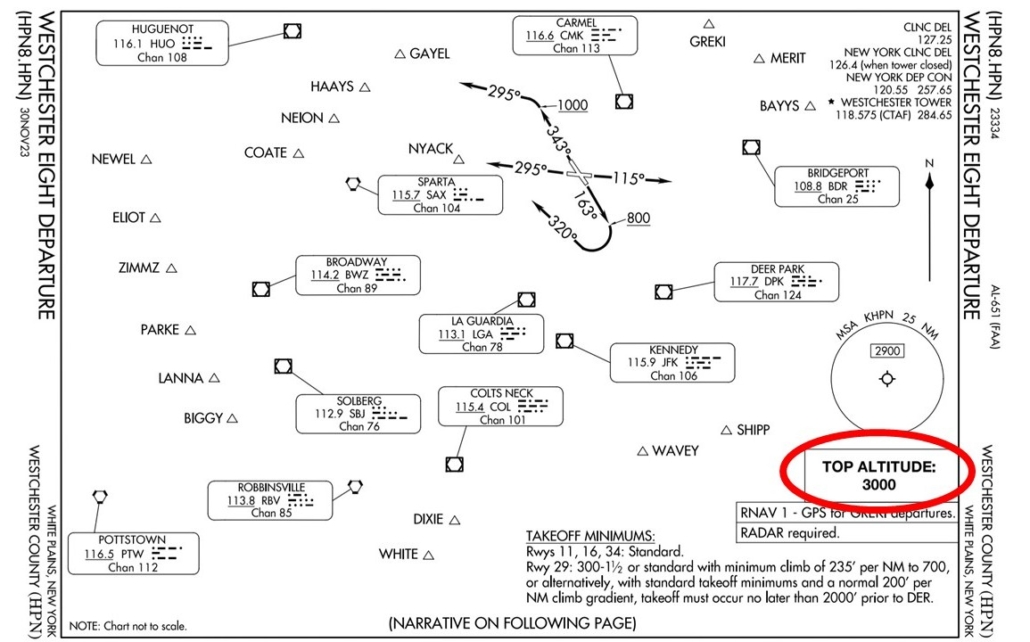
What altitude did you level off at on the departure?
The departure for runway 11 is straightforward (literally), but since you were given a ‘climb via’ clearance, hopefully you leveled off at 3,000 feet, which is the top altitude of the Westchester Eight departure. New York crams a lot of traffic, destined for several airports in close proximity, into the same volume of airspace, so they like their departure procedures to keep departing aircraft separated.
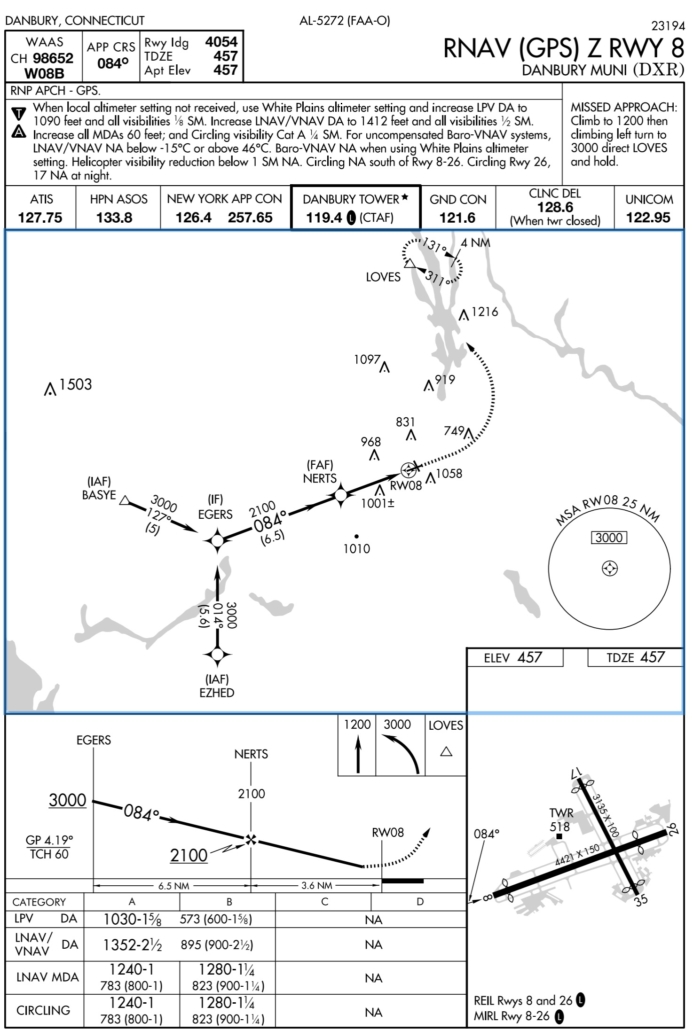
RNAV (GPS) Z RWY 8 at DXR
As you approach EZHED, ATC clears you for the approach at Danbury:
“Maintain 3,000 to EZHED, cleared RNAV (GPS) Z RWY 8 approach.”
Extra Challenge (click for more)
Instead of flying the full procedure from EZHED, try it using vectors to final instead. Full procedures take more time and usually give you ample opportunity to get yourself and the aircraft prepared for the approach. However, this being New York airspace where extra time is a luxury, don’t be surprised by vectors to final that give you a bit less time to get ready. From near EZHED, ATC tells you:
“Fly heading 030, maintain 2500 until established on the final approach course, cleared RNAV (GPS) Z RWY 8 approach.”
Regardless of how you started the approach, descend as low as you think you should and then assume you had to go missed. After you let Tower know that you have gone missed, they hand you back off to New York Departure in short order. Since you missed at Danbury once, you elect to call it a day rather than push your luck and as you make the turn toward LOVES on the published missed approach you let Departure know your intentions to return to White Plains. ATC responds:
“Radar contact, for now climb to 3,000 and proceed direct CZIMR, expect the ILS RWY 16 approach at Westchester County.”
Were you able to make it into DXR on the RNAV Z to runway 8?
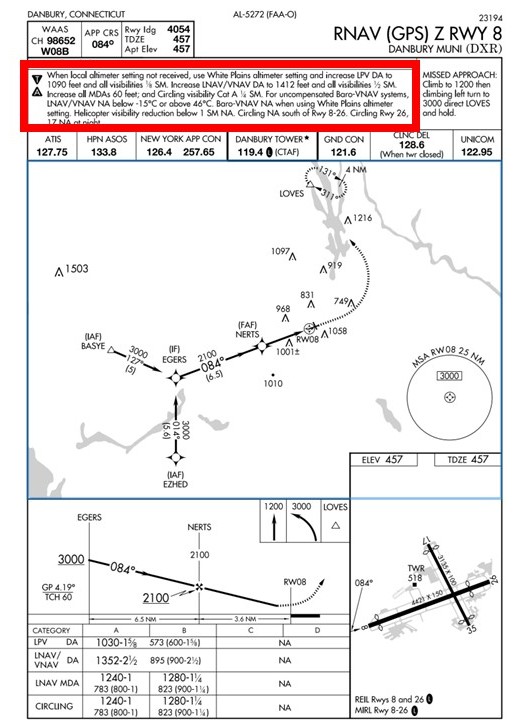
If you did, you might need to take a closer look at the notes at the top of the RNAV (GPS) Z RWY 8 chart, particularly the one about “when local altimeter setting not received, use White Plains altimeter setting and increase LPV DA to 1090 feet and all visibilities 1/8 SM.” Since the NOTAMs you received before takeoff showed the ASOS at DXR was out of service, you’ve been using the HPN altimeter setting since takeoff. Given the weather conditions, you should have still been in the soup when you hit the new adjusted decision altitude.
Notes like this are commonly seen on approach charts, since the lack of an altimeter setting (or a tractor running into the ASOS sensor) could make IFR operations unusable by many operators. The minimums are increased when using a remote altimeter setting to account for localized pressure differences between the approach airport and the altimeter setting source. In cases when an IFR airport doesn’t have a weather station, any approaches will be based entirely on a remote altimeter, and the adjustment will be baked into the published minimums.
Did you notice anything out of the ordinary on this approach?
This is a pretty textbook approach, but there are a couple of little details that should catch your attention. The first that you would probably notice right away is that the approach has a “Z” suffix. That’s your cue that there are multiple approaches of the same type (in this case RNAV) to the same runway, where the suffixes are usually (but not always) ordered with Z offering the lowest minimums. Then Y and so on.
The next detail that you might notice is that this approach is limited to category A and B only, whereas most approaches support categories A through D. That’s not a factor for what you’re probably flying today. But it’s a bit out of the ordinary and should make you wonder what would impose such a limitation. Finally, note the steep glidepath angle of 4.19 degrees. That’s probably the most operationally significant oddity on this approach. Plot twist: it’s the root cause of the other curiosities discussed here.
Ok, it’s not much of a plot twist. The steep glidepath angle restricts operation by category C and D aircraft, which in turn leads to the need for a “Y” procedure that allows for category C and D aircraft. Here’s the plot twist: the C and D categories come at the cost of LPV minimums.
That steep descent angle also means that following the LPV glidepath will require a higher vertical speed than you’re used to seeing, about 630 ft/min at 90 knots. On approaches with the standard 3-degree glidepath it’s about 450 ft/min. This could lead to a correspondingly higher approach airspeed, unless you fly the approach with a slightly lower power setting than usual. You have a little less time than usual on the final segment to get all of these speeds and angles worked out. It’s shorter than usual: 3.6nm vs. the typical 5nm.
ILS 16 at HPN
As you proceed inbound you check the weather at HPN and it’s (unsurprisingly) about the same as when you took off. Halfway to CZIMR ATC calls you back:
“Be advised, Westchester airport is temporarily closed due to a disabled aircraft on Runway 16. Expect the ILS Runway 16 approach, circle to land Runway 11. For now, cleared direct CZIMR, hold northwest as published. Maintain three thousand. Expect further clearance in 30 minutes.”
Hurray! You can use this break to get fully setup for the approach and have your circle-to-land planned out. Do so. Once you feel you’re all set, we’ll say ATC clears you for the ILS Runway 16 approach. Since you’re holding at 3,000, you’ll need to work your way down to 2,100 until you turn inbound to cross CZIMR at 2,000.
Once you’re past CZIMR you check in with tower who clears you to land on Runway 11. Once you’re safely back at the ramp at HPN, try not to think about the fact that it would have been quicker just to drive.
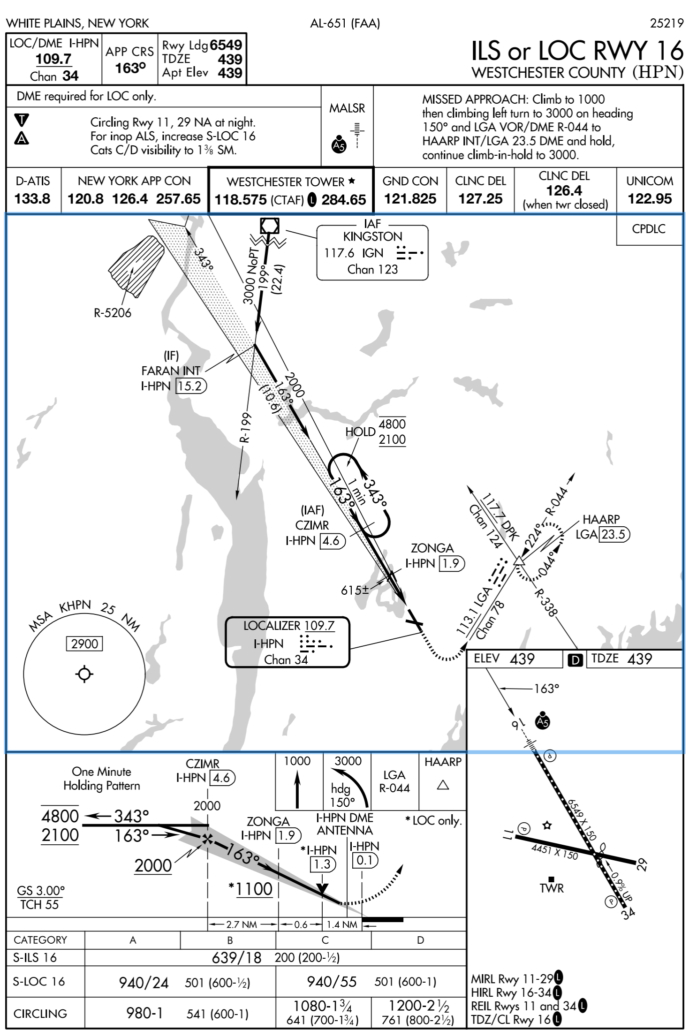
How did you set up the hold and how long could you hold?
The hold at CZIMR is a hold-in-lieu-of procedure turn, so if you loaded it into your navigator as part of the ILS Runway 16 approach, the navigator’s standard logic is to treat it as a course reversal where it would fly one lap around the hold and then continue inbound with the approach. However, that’s not what ATC said. You must remain in the hold until you receive further clearance. Hopefully you anticipated this and told your navigator to suspend sequencing once you were established in the hold. Otherwise, if it continued inbound, you’d have a mess of activity on your hands to stay in the hold and reload the procedure. (You also told ATC when you were entering the hold, right? Good.)
You might also think about how much time you could hold, considering your fuel status. We didn’t have a fuel load planned for you in this challenge, so this is more of a thought exercise. Consider the time needed to fly the approach and then fly to an alternate if you had to go missed, translate that into gallons and then add in the reserve fuel you’d want to land with. Then subtract that from your current fuel and then translate the remaining fuel into time spent at a reduced power setting for holding. That should give you an idea of how long you could hold before you had to go elsewhere. Again, not a factor here, but a similar hold at the end of a long cross country could be a different story.
Did you do anything different on this ILS approach?
Flying an ILS that ends in a circle-to-land may seem like a strange combination, but it does crop up occasionally, and in some places is a standard tool used by ATC (such as the ILS 6 circle to runway 1 at Teterboro). However, it’s uncommon enough to require some extra forethought. Most important is recognizing that an ILS followed by a circle-to-land is essentially following the glideslope down to the non-precision circling minimums, so don’t drift below them on a go-around. Also keep in mind that flying an autopilot coupled approach won’t know you’re planning to circle and will not stop at the circling minimums (so consider using vertical speed mode).
Once you descend to the circling minimums, level off and look for visual references, as opposed to initiating a missed approach like on a normal ILS. Stay on the approach course until you’re within the protected circle radii (1.7nm for a category B approach) then commence your pre-planned circling maneuver.
What was your strategy for flying the circle to land?
Flying a circling maneuver when the visibility is restricted and/or low ceilings keep the airplane down near minimums is one of the most challenging and riskiest things instrument pilots will encounter. It should be thought of as the main event, not just a traffic pattern after the approach, and requires deliberate planning. Circling maneuvers impose a mechanically high workload on the pilot, but the lower-than-usual “pattern altitude” and restricted visibility can also mess with your sight picture and can lead to misjudging your distance from the runway. One thing is certain: You really want to avoid a missed approach out of a botched circling maneuver.
You could use the strategy of (paraphrasing Lord Nelson) “never mind the maneuvers, just go straight at them”—once you’re within the protected circling radius make a right turn and enter left base for Runway 11. That’s straightforward but it leaves you more vulnerable to illusions. You must judge your turns to base and final perfectly to end up in position and on altitude when you’re starting from a non-standard location and altitude.
An alternative strategy is crossing over the approach end of Runway 11 and entering the upwind, slightly offset from the runway. Then you can make it a somewhat normal traffic pattern. It’ll take longer and it might make Tower grumpy. But it leaves less to chance and ensures you’re not rushed. When visibility is limited, it can be helpful to time your crosswind turn for about 45 seconds to ensure adequate spacing from the runway while still remaining in the protected circling area.
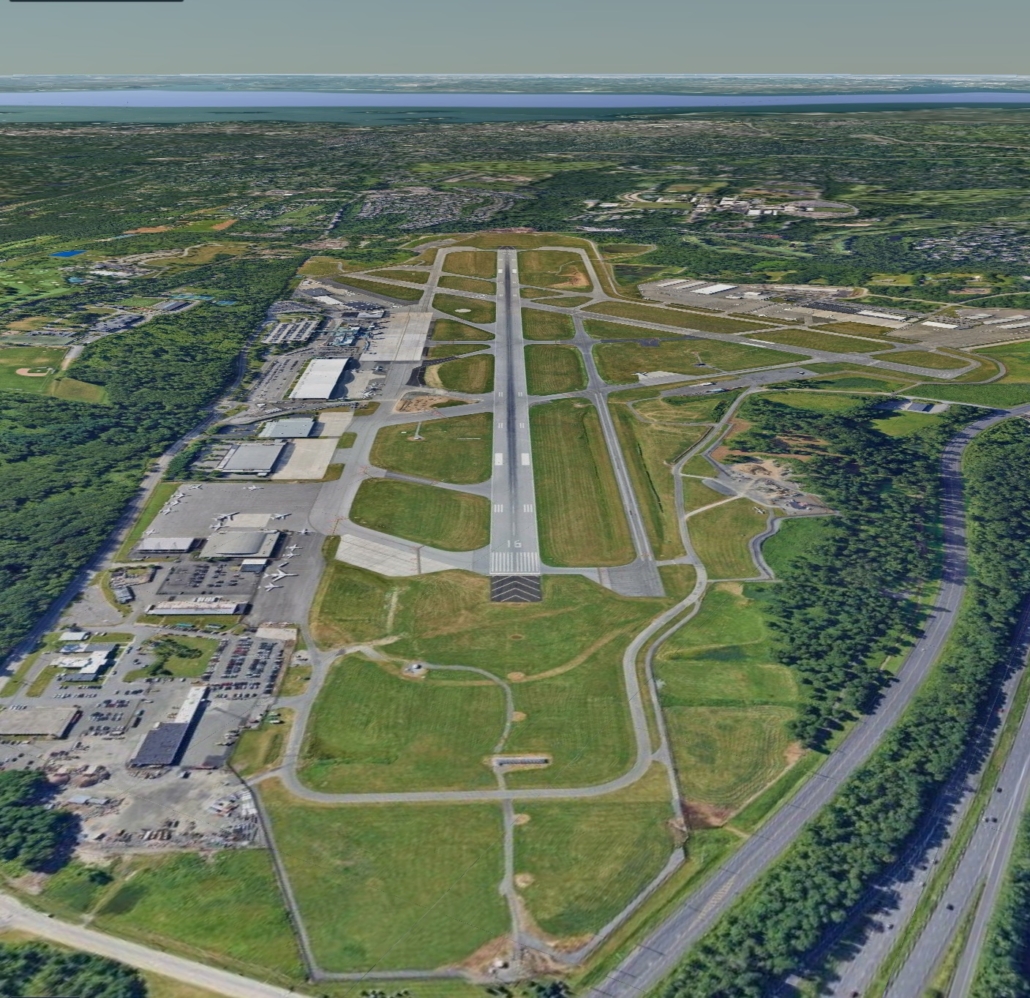
Is there a high-tech way to stay inside the circling area?
An old-school trick was to mentally use the runway as a yardstick. If the runway is 6,000 feet, that’s a nautical mile. If you’re circling area is 1.7nm from any runway, then staying within a runway and a half distance is safe.
That can be hard to judge at an angle, but it’s really easy on the moving map with its top-down view (and lack of misty clouds making distance judgement harder). You can also use cross-track error. That will show the lateral distance off course, which will be off the final approach course until you activate a missed approach. If the approach was aligned with a runway, you can stay within that distance to one side or the other of the runway as you circle. If the airport has crossing runways, the actual protected space is larger than the crosstrack error to one runway. But it would never be smaller.
Of course, you don’t want your head inside for more than a moment here and there. But that’s better than running outside your protected circling area.

Every Sim Challenge is an opportunity to sharpen your IFR skills, stretch your decision-making, and build confidence in a safe environment. Whether you complete the flight flawlessly or run into a few bumps along the way, the real value comes from thinking through each step and learning from the scenarios. We hope you enjoy the challenge—and don’t forget to share your thoughts or questions or ideas for future challenges.

- What Lies Beneath the MDA - June 25, 2026
- Sim Challenge: Trusting the Wrong Glidepath - June 23, 2026
- Sim Challenge: The Lowdown (IFR) - February 3, 2026

Leave a Reply
Want to join the discussion?Feel free to contribute!