
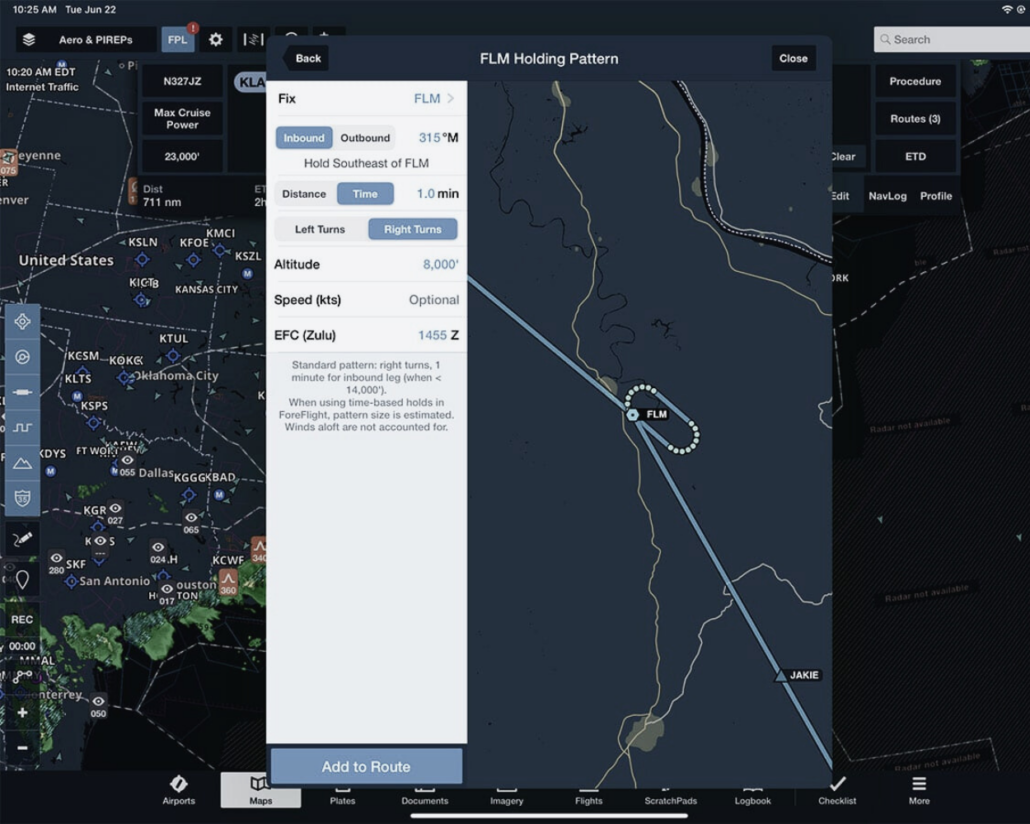
Video Tip: Entering a Hold with ForeFlight Hold Advisor
|
Getting your Trinity Audio player ready...
|
If weather or an ATC delay requires you to fly a holding pattern, you can use ForeFlight’s Hold Advisor feature to add the details of the hold to the flight plan. If you receive a clearance to hold at a waypoint currently entered in your flight plan, tap that waypoint ID in the Route Editor and select the Hold function. You can then enter the details of the holding clearance, including the inbound or outbound course, either a time or distance, left or right turns, altitude, speeds restrictions, and an expected further clearance time.
This video tip appears in Sporty’s Flying with ForeFlight training course, which features more than three hours of in-depth training on how to use aviation’s most widely used EFB app.


The IFR Focus Team is made up of experienced flight instructors, professional pilots, and editors dedicated to helping instrument pilots sharpen their skills. Drawing on decades of real-world flying and teaching experience, the team curates practical tips, training resources, and scenario-based content to make IFR flying safer and more enjoyable.
Latest posts by IFR Focus Team (see all)
- Webinar: What’s New With ForeFlight - October 8, 2026
- Webinar Video: Garmin AXIS Flight Displays - October 2, 2026
- Video Tip: Understanding STARs - September 22, 2026

Leave a Reply
Want to join the discussion?Feel free to contribute!